
The industry's most comprehensive Multi-Dwelling Units (MDU) network design platform — plan fiber, Wi-Fi, and outside-plant cabling for apartments, condos, hotels, and campuses in one integrated tool. From floor plan to procurement-ready bill of materials.
No installation. Web-based. Upload specific floor plans or create building plans for Brownfield deployments.
Built for fiber consultants, ISP planners & MDU integrators
Six tightly integrated views — placement, RF, OSP, schematics, 3D, and BOM — all driven by one project data model. Change a building footprint and every view updates in sync.
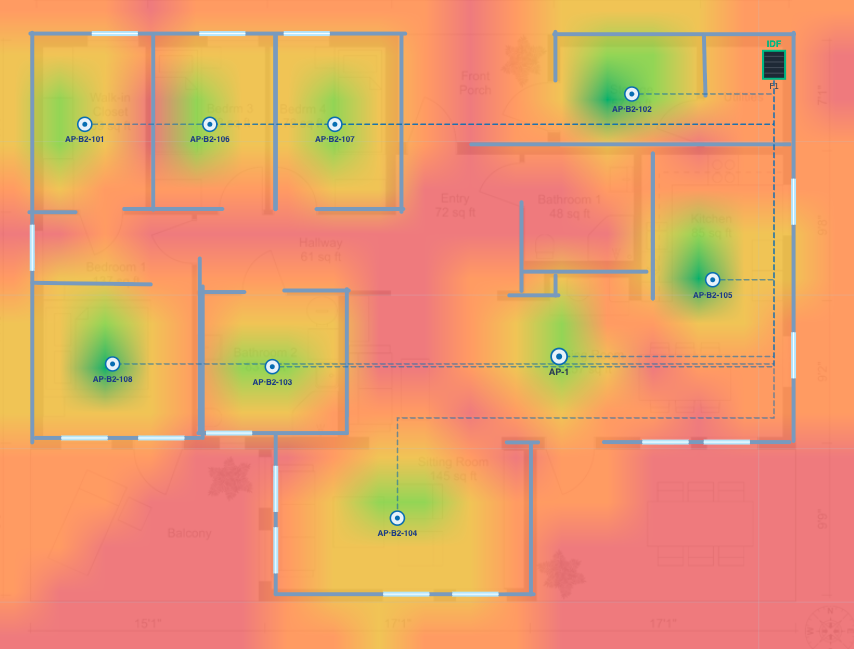
Upload specific floor plans or create building plans for Brownfield deployments. Place APs, ONTs, IDFs, and units with smart defaults — hallway or per-unit deployment modes.
Predict campus-wide signal coverage with realistic building attenuation. Synced 2D overlay + 3D ground-plane texture, computed off the main thread.
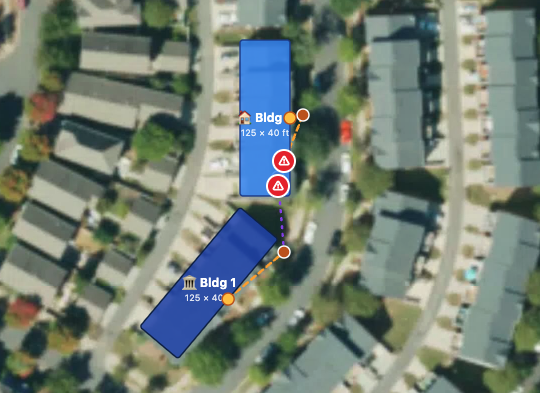
Click-to-pick install method per cable segment — trench, bore, or aerial. NEC-aware crossing warnings flag cables running through buildings.
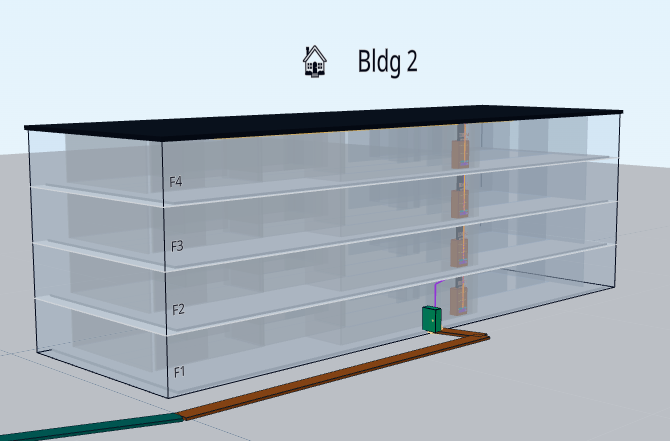
Three.js-powered 3D rendering that mirrors the 2D plan in real time. Walk the campus, inspect routes, validate clearances before construction.
Every line item traces back to a placement. Headend gear, IDF gear, OSP fiber, microducts, labor — calculated, not estimated. Export to PDF.
Built for consulting firms and ISP planning teams. Organizations, per-user roles, shared catalogs of AP models & equipment SKUs.
Start with a project setup wizard. Upload floor plans. Drag building footprints into place. Watch every other view auto-update.
Enter your project's basic parameters once — number of buildings, floors per building, units per floor, square footage, deployment architecture — and they propagate to every building in the project. Override per-building as needed.
Upload specific floor plans or create building plans for Brownfield deployments. Calibrate scale once with two clicks. The system auto-places hallway or per-unit access points; you fine-tune by dragging. Doors, units, and IDF cabinets render to match your plan.
Drag building footprints. Click any cable to pick its install method (trench, bore, or aerial) for each segment. The system automatically warns when a cable would run through another building's interior — an NEC 770/800 violation in the field.
The 3D view mirrors the 2D plan in real time — buildings extruded to their floor count, cables following the same waypoint routes, RF coverage projected as a ground texture. Hand the BOM straight to your procurement team.
Other tools handle pieces. Glow MDU handles the whole picture — from RF coverage to the procurement order.
Most planning tools handle either RF coverage OR outside-plant routing OR bill-of-materials. Glow MDU is the first to integrate all three with a 3D campus view and floor-level placement in a single project model.
Every BOM line item traces back to a placement on the canvas. No more spreadsheets that don't match the field. The materials list IS the design.
The system warns when an OSP cable route would violate NEC 770/800 (running outside-plant cable through a building interior). Catch compliance issues at design time, not during inspection.
Outdoor RF coverage modeling correctly handles APs mounted on building exteriors — exempting the AP's own building from wall-attenuation counts, while honoring obstructions from neighboring buildings.
No installs, no version mismatches. Built for consulting firms with per-organization catalogs, per-user roles, and shared equipment libraries. Onboard new engineers in minutes.
Web-worker propagation calculations, GPU-accelerated 3D rendering, and incremental rebuilds mean the tool stays responsive even on projects with 20+ buildings and 100+ floors.
Glow MDU is designed for the unique constraints of multi-dwelling units — not adapted from generic indoor planning tools.
Garden-style or high-rise. FTTU + Wi-Fi per unit.
Hallway-AP layouts with high guest density coverage.
Dormitories with per-unit ONTs and dedicated APs.
Inter-building OSP routing with shared MDF.
Reliable coverage for medical & emergency systems.
Plan before slab pours. Validate conduit pathways.
Document existing networks, plan upgrades incrementally.
Standardize across the portfolio with reusable templates.
Designed for consulting firms, ISPs, and integrators of every size. Get hands-on with the full product before committing — and ask about early-access discounts when you do.
Book a 30-minute demo. We'll walk through your real floor plans and show you the BOM Glow MDU produces — live, in your browser.